Vibe Coding an MP3 CD Burner: A Journey from Tauri to GPUI
The Motivation: Burning CDs in 2026
It started with a simple desire: I wanted to burn MP3 CDs.
My car has a CD player which is also capable of playing MP3 CDs, and while I could use Bluetooth or an aux cable, there’s something satisfying about a physical disc. The problem? My music library is a mix of formats: MP3s at various bitrates, FLACs for albums I really care about, AAC files from old iTunes purchases, and the occasional OGG or Opus file. I wanted an app that could:
- Take a bunch of folders (albums)
- Figure out the optimal MP3 bitrate to fit everything on a 700MB CD
- Convert everything to MP3, being smart about it (don’t transcode a 192kbps MP3 just to make it 256kbps)
- Burn it to a disc
macOS has Finder and Disk Utility, but they don’t do the bitrate calculation or format conversion. I could cobble together a shell script with ffmpeg and hdiutil, but I wanted something I could actually use — with drag and drop, progress bars, album art thumbnails. A proper app.
So I decided to build one. With Claude’s help.
Early Success with Tauri
I’d heard good things about Tauri: native performance, small binaries, Rust backend with a web frontend. It seemed perfect — I could use HTML/CSS for the UI (familiar territory) while writing the audio processing and CD burning logic in Rust.
The first few weeks went surprisingly well:
The Good:
- Basic folder scanning and metadata extraction worked beautifully with the Symphonia library
- FFmpeg integration for audio conversion was straightforward
- Parallel processing with Tokio gave me fast encoding
- The UI came together quickly with plain HTML/CSS
- CD burning worked via macOS’s hdiutil command-line tools
Within about 50 commits, I had a working app. You could drag folders onto it, see album art thumbnails, watch files convert with progress bars, and burn the result to a CD. The smart bitrate calculation worked — it would figure out that 2 hours of lossless audio needed to be encoded at roughly 192kbps to fit on a 700MB CD.
I was ready to call it done. Then I tried to add one more feature.
The Wall: Drag and Drop
I wanted two types of drag and drop:
- External drops: Drag folders from Finder into the app to import them
- Internal reordering: Drag folders within the app to change their order on the CD
This seems simple. It’s what every file manager does. But in Tauri’s WebView environment, I hit a wall.
The issue was fundamental to how Tauri handles drag and drop. The WebView captures drag events, and you can either:
- Let the browser handle drag/drop (which works for internal reordering)
- Or intercept system drag events for external files
But not both at the same time. At least not in a way that felt native.
I tried various workarounds:
- Different event handlers for different drop zones
- Detecting whether the drag started internally vs externally
- Custom ghost images during drag
Nothing felt right. The app would sometimes capture external drops when trying to reorder, or vice versa. The drag preview (the little image that follows your cursor) was a mess of competing systems.
This might seem like a small thing, but for an app whose entire purpose is “drag folders, burn CD,” having broken drag and drop was a dealbreaker.
Discovering GPUI
Around this time, Zed (the text editor) had been open-sourced, and with it their UI framework: GPUI. I’d been curious about it — a pure Rust UI framework that renders with GPU acceleration, designed for responsive, native-feeling applications.
More importantly, GPUI was designed from the ground up with drag and drop as a first-class concept. It has distinct systems for:
- ExternalPaths: Files dragged from outside the app
- Typed internal drags: Custom drag-and-drop with type-safe payloads
This was exactly what I needed. The two systems are designed to coexist.
The catch? I’d have to rewrite the entire frontend. In Rust. Having never used GPUI before.
The Migration
Here’s where “vibe coding” with Claude really showed its value. Instead of diving in and hoping for the best, we created a detailed migration plan. The plan broke down the work into phases:
What could be copied directly:
- Audio detection and metadata extraction (pure Symphonia, no Tauri deps)
- Encoding strategy logic (pure Rust enums and match expressions)
- Profile save/load (just filesystem operations)
What needed adaptation:
- CD burning (remove Tauri event emission, return Results instead)
- ISO creation (similar simplification)
What needed complete rewriting:
- The entire UI layer
- State management (GPUI’s Entity/Context model vs Tauri’s State)
- Menus and dialogs
The first commit to mp3cd-gpui was titled “Initial commit: GPUI migration through Phase 3” — we’d done the first three phases in one focused session, getting a basic window with folder list and drag-drop working.
Then the real work began. Over 91 commits and roughly two months, the app grew:
- Phase 4–5: Core audio scanning, conversion pipeline with parallel encoding
- Phase 6: CD burning with progress tracking
- Phase 7: Native macOS menus with keyboard shortcuts
- Phase 8: Profile save/load with bundle format for portable “ready to burn” states
- Phase 9–13: Polish, testing, and features the original never had
Going Beyond the Original
Something interesting happened during the GPUI rewrite. Freed from the constraints of the Tauri architecture, new possibilities opened up:
Background encoding: In the Tauri version, you’d add all your folders, then click “Convert & Burn” and wait. In GPUI, folders start encoding the moment you add them. By the time you’ve dragged in all your albums, most of the work is already done.
Smart re-encoding: When the calculated bitrate changes (because you added more music), lossless files automatically re-encode at the new bitrate. The Tauri version would have needed a whole separate encode-on-demand system.
Track Editor: This wasn’t even in the original plan. But once the internal drag system was working so smoothly, it was natural to add a window where you could reorder individual tracks, exclude songs you don’t want, and create mixtapes from multiple sources.
Parallel everything: The GPUI version uses a global file queue with 2–8 worker threads. Every file across every folder goes into one pool. The Tauri version did per-folder parallelism, but the queue approach is more efficient.
Bundle save format: You can save a profile as either a tiny metadata file (~1KB) that re-encodes when opened, or a full bundle (~600MB) containing all the converted audio — completely portable, opens instantly, ready to burn.
The final app has 43.58% test coverage, down from 0% in the Tauri version. The architecture is cleaner. The code is more maintainable. And it actually does everything I wanted.
Lessons Learned
Framework fit matters more than familiarity. I chose Tauri because I knew HTML/CSS. But the web platform’s drag-and-drop model was fundamentally wrong for my use case. GPUI, despite being unfamiliar, was the right tool.
Migration plans save time. Writing out exactly what could be reused vs what needed rewriting prevented false starts. We knew from the beginning that the audio and burning modules would transfer almost unchanged.
AI collaboration works best with structure. Claude couldn’t magically fix Tauri’s drag-and-drop issues — that was a framework limitation. But it could help me understand why the limitation existed, evaluate alternatives, create a migration plan, and execute it piece by piece.
The “vibe” in vibe coding isn’t about lack of planning. It’s about maintaining creative momentum. Having an AI partner that can keep up with your thinking, understand context, and help execute ideas quickly lets you explore more possibilities. The Tauri refactoring plan, the GPUI migration plan, the bundle format design — these all came from collaborative sessions where we could quickly prototype ideas and see what worked.
Small apps can be surprisingly deep. This is “just” a CD burner. But it touches audio metadata parsing, parallel processing, filesystem operations, subprocess management, ISO formatting, UI state management, and macOS system integration. Simple problems compound.
The Result
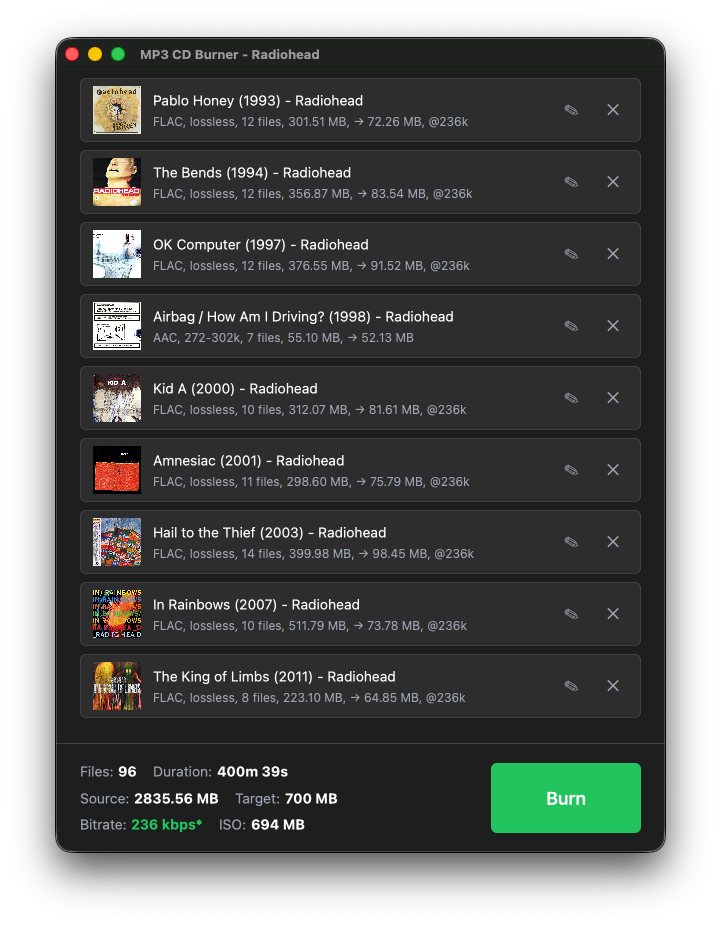
MP3 CD Burner 1.1.0 is now available on GitHub. It does everything I originally wanted:
- Drag folders in, see them start encoding immediately
- Smart bitrate calculation to maximize quality within 700MB
- Two-phase encoding (lossy first, then lossless at calculated bitrate)
- One-click burn with CD-RW support
- Save/load profiles for repeat burns
- Track editor for mixtapes
The Tauri version sits in a sibling folder, abandoned at the Burn Profiles feature. It works well enough for basic burns. But it doesn’t feel right. The GPUI version does.
Sometimes the right move is to throw it away and start over with better tools. It took me about 50 commits to realize Tauri wasn’t the answer, and 91 more to build the answer in GPUI. That second phase took roughly the same calendar time but produced a significantly better result.
Would I have gotten here without AI assistance? Eventually, probably. But the ability to work at conversational speed, to explain a problem and get working code back, to iterate through design decisions quickly — that’s what made this feel like “vibe coding” rather than grinding through documentation.
The CD plays fine in my car.
MP3 CD Burner is open source and available at github.com/jerimiah797/mp3cd-burner. Built with GPUI, FFmpeg, and a lot of help from Claude.