Why I Built a Self-Managing Homelab
Part 1 of "A Self-Managing Homelab" — a series about building home infrastructure that monitors itself, alerts intelligently, and sometimes fixes its own problems.
I woke up one morning and my phone couldn't reach the internet.
The WiFi icon was churning — connecting, disconnecting, connecting again. My VPN, which is set to auto-engage when I'm off WiFi, was also thrashing, trying and failing in a loop. Nothing loaded. No email, no weather, no news. For all I could tell, the internet was completely down.
Except it wasn't the internet. It was Pi-hole — the DNS server at the heart of my network. Without DNS, nothing on my network could resolve a hostname. Every device in the house was effectively offline. My phone was cycling between WiFi and cellular, my smart home was dead, and my streaming was a brick.
And I had no idea. No alert, no notification, no dashboard to check. Just a broken phone and a growing suspicion that I'd done this to myself.
I couldn't even start diagnosing the problem, because the tools I'd use to diagnose it — SSH, a web browser, anything that needs a network — all depended on the thing that was broken. I ended up hunting through drawers for a USB-C ethernet dongle that is never where it's supposed to be, then finding a network cable long enough to reach from my desk to the switch. Only after physically hardwiring into my own network could I actually see what was going on.
And it wasn't even Pi-hole's fault. I didn't know it at the time, but the Proxmox node hosting Pi-hole had an NVMe drive that was dying — not dead, just mostly dead (inconceivable!). Under light load it worked fine. But when the nightly backups kicked in and hammered the disk with I/O, it flooded the node with PCI errors until the whole thing soft-locked. Pi-hole went down as collateral damage, and took my entire network's DNS with it.
I rebooted the node, everything came back, and I figured it was a fluke. Then it happened again the next night.
That was the moment I decided my homelab needed to grow up. Not bigger — smarter. I wanted a system that could tell the difference between "the internet is down" and "Pi-hole crashed and needs a restart," and ideally handle the second one without involving me at all.
This series is about how I got there: three mini PCs, a pile of containers, a suspicion that I needed a monitoring stack, and eventually an AI that triages my alerts for me. But before any of that, let's talk about why.
What I Actually Wanted
Like a lot of homelabbers, I started with one thing and kept adding. But the underlying motivation wasn't just "this is fun to tinker with" — it was privacy. I was tired of Google and Facebook knowing everything about me. Every search, every contact, every calendar event, every file. I wanted to de-Google my life.
Pi-hole was the first step — not just ad blocking, but tracker blocking. Network-wide, for every device, no browser extensions required. A Raspberry Pi, a weekend afternoon, done. And immediately I could see how much telemetry was being phoned home by devices I thought I controlled.
Then Nextcloud, because I wanted my files, calendar, contacts, and even messaging (via Nextcloud Talk) on infrastructure I owned. Not Google Drive, not iCloud — mine. Then Plex, because I had a Drobo full of media sitting on the network. Then a VPN because I wanted to reach everything remotely. Then Home Assistant because I had smart lights and wanted them to actually be smart. Then Gitea because I wanted to self-host my repos. Then a reverse proxy because I wanted real domains pointing at all of this.
You know how it goes. What starts as "I'll just run Pi-hole" turns into a full service catalog:
- Pi-hole — DNS-level ad and tracker blocking for every device on the network
- Nextcloud — files, calendar, contacts, messaging — the Google replacement
- Plex — media streaming with the *arr stack for automation
- Home Assistant — home automation hub
- WireGuard — VPN for remote access
- Gitea — self-hosted git
- Ghost — blogs and photo site
- Mastodon — my own social media instance, replacing Twitter doomscrolling
- Photos — photo management with automatic backup from my phone
- Sirens — a custom app and API that shows 911 emergencies happening near me in Seattle, zero-click experience
- Unifi Controller — network management
- Plus more: dev containers, a reverse proxy, dynamic DNS, and whatever I'm tinkering with this week
All of this ran fine. Most of the time.
The Problem Nobody Warns You About
Here's what the homelab subreddit doesn't emphasize enough: running services is easy. Keeping them running is the actual job.
It's not the initial setup that gets you. It's Tuesday at 11pm when Nextcloud stops syncing and you can't figure out why. It's your VPN silently dying because your dynamic DNS didn't update after an IP change. It's discovering that your nightly backups haven't actually run in two weeks because a cron job was pointing at a mount that doesn't exist anymore.
For a while, my "monitoring" strategy was noticing things were broken when I tried to use them. That works when you have three containers. It absolutely does not work when you have twenty-five.
I eventually set up Prometheus with email alerts. In theory, it would email me when something went wrong. In practice, I had email working from exactly one node — because configuring Postfix is the kind of thing you do once, swear at for an afternoon, and never voluntarily do again. So alerts from that node would arrive, and I would... ignore them. Not maliciously — I just developed alert blindness. Too many emails, too little signal. Every reboot generated a cascade of "InstanceDown" alerts that all resolved thirty seconds later. The important stuff drowned in noise.
The core problem wasn't the alerting tool. It was that alerts need judgment. Is this actually a problem? Is it urgent? What should I do about it? Those are human questions, and answering them while reading through a wall of email noise is miserable.
Treating It Like Real Infrastructure
At some point I realized I was solving a problem that the industry solved decades ago. SREs at Google don't stare at dashboards waiting for things to break. They build systems that:
- Monitor everything worth monitoring
- Alert only on things that need action
- Automate the responses that don't need human judgment
- Escalate the ones that do
So that became the plan. Not all at once — this evolved over a few days — but the end goal was clear: a homelab that manages itself, with me as the escalation path rather than the first responder.
The Hardware
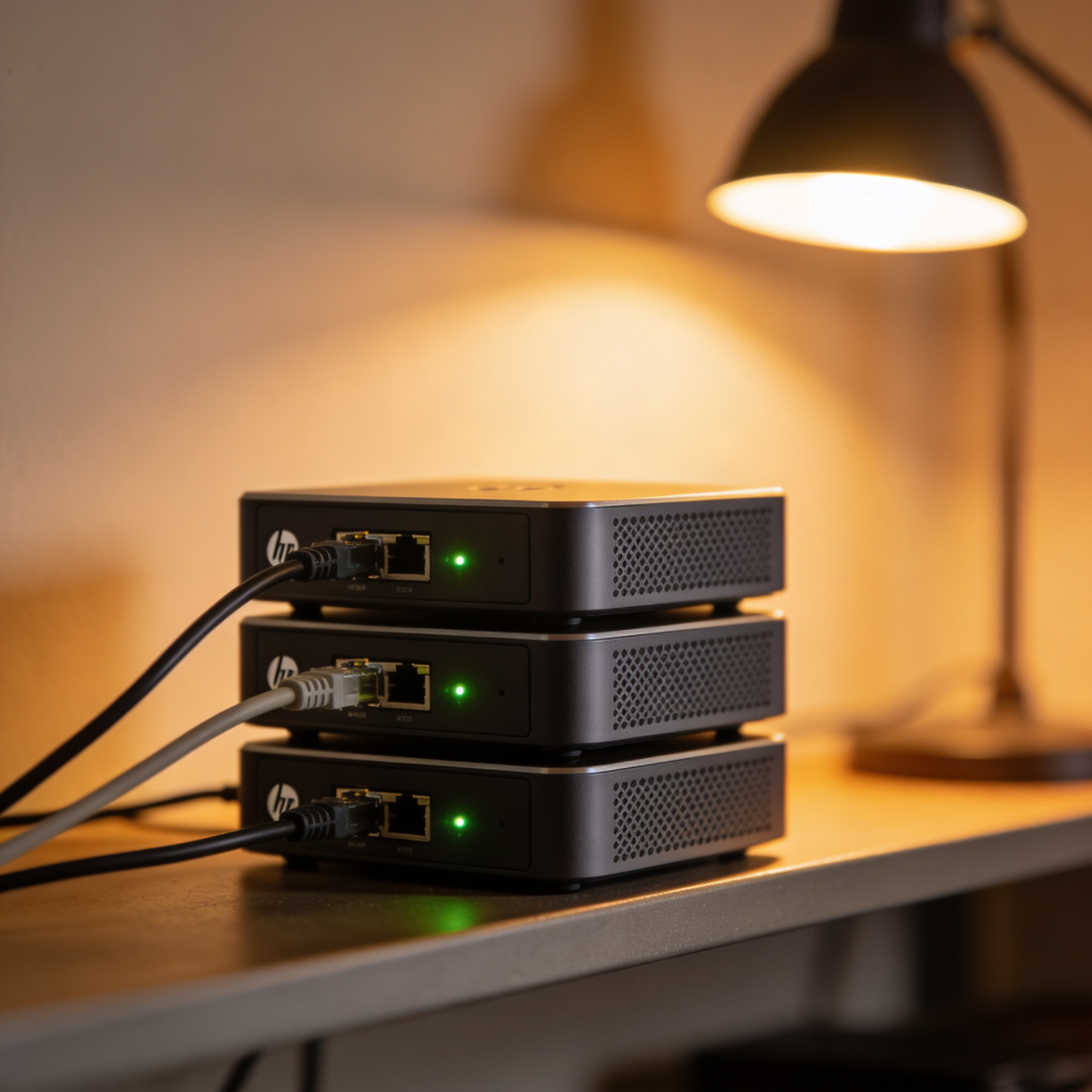
I run everything on three HP mini PCs — those 1-liter form factor machines that offices throw out by the pallet when they do refresh cycles. I picked mine up used for around $150 each. 16GB RAM, NVMe storage, and they sip power — about $10-15/month total for the whole cluster.
They're not fast. They're not fancy. But they're small, quiet, and reliable, and three of them gives me enough headroom to spread critical services around so that a single node going down doesn't take out everything.
The storage situation is local NVMe on each node (fast, reliable, simple) plus a Drobo NAS on the network for media. For the critical stuff — container backups, configs, databases — I'm using Proxmox Backup Server with deduplication. Three nodes worth of daily backups fits in about 63GB because of incremental forever and dedup. It's genuinely impressive.
The mini PCs run Proxmox — free, mature, handles both containers and VMs, and the web UI means I'm not SSH-ing in for basic tasks. They're configured as a cluster, which is mostly a management convenience. I deliberately spread critical services across nodes: DNS on one, the monitoring stack on another, media on a third. If a node goes down for maintenance, the important stuff keeps running, and I have container backups to restore on another node. Moving services between nodes is trivial.
What "Self-Managing" Actually Means
Let me be clear: my homelab does not run itself. I still make decisions, still do maintenance, still break things regularly. What it does do is handle the boring parts:
It monitors itself. Prometheus scrapes metrics from every host and container every 30 seconds. CPU, memory, disk, network. Whether services are up. Whether external sites are reachable. Whether the UPS battery is healthy. Whether dynamic DNS is in sync. Whether last night's backups actually ran.
It alerts intelligently. Not "something changed" — that's noise. It alerts when something needs action. Disk over 85%? Alert. Container restarted? That's fine, it probably came back. Backup hasn't run in 26 hours? That's a problem. There's nuance baked in: the alerts know that some containers are supposed to be stopped, that the Raspberry Pi might be unplugged, that a brief network blip during the nightly update window is expected.
It backs up automatically. Every night at 3am, all containers get snapshotted to PBS. At 4am, those backups get copied to an external SSD. At 5am, my NAS media gets synced to separate backup drives. If any of those jobs fail, I get an alert. If they succeed, I hear nothing. No news is good news.
It fixes some things on its own. This is the newest and most experimental part: an AI agent that receives alerts, assesses them, and either handles them automatically or sends me a Telegram message with context and a recommendation. "Docker disk space is low on proxiot — I can auto-prune unused images, or you can investigate. [Approve] [Deny]." That's a lot more useful than "DiskSpaceLow on proxiot:9100."
What's Coming in This Series
Over the next several posts, I'll walk through each layer of this system:
- The Proxmox cluster — node roles, container distribution, and why keeping it simple beats doing it fancy
- The monitoring stack — Prometheus, Alertmanager, Grafana, and the philosophy behind alert rules that don't drive you crazy
- The backup system — PBS, offsite copies, media backups, and how monitoring ties into all of it
- The AI alert agent — the most interesting part, and the one that actually lets me sleep through the night
- The services — what I actually run day-to-day and why
- Lessons learned — what worked, what didn't, and what I'd do differently
Total cost for all of this: about $500 in hardware, $12/year for a domain, and whatever electricity three tiny PCs consume. No cloud bills. No subscriptions. Everything runs on my network, under my control.
Is it more work than just paying for Google Drive and a Plex Pass and calling it a day? Absolutely. But it's work I find genuinely interesting, and the result is a system that mostly takes care of itself — with me as the safety net, not the engine.
And I haven't woken up to broken internet in months.
Next up: [Part 2 — Proxmox Clustering on Mini PCs](/blog/proxmox-clustering-on-mini-pcs)