I Built a Debug Server So My AI Agent Could Actually Test My iOS App
The story of how and why I built a tool for my AI coding assistant that lets it work directly with mobile devices.

How and Why I built Quern
A few weeks ago I was sitting at my desk, watching Claude Code write a perfectly good networking layer for my iOS app. The code compiled. The unit tests passed. And I had absolutely no idea if it actually worked.
That gap — between “build succeeded” and “it actually works” — is where I’ve been living for the past month. It turns out closing it required building an entirely new tool.
The problem that wouldn’t leave me alone
My day job is in QA and test automation. On the side, I’ve been contributing to Metatext, an open-source Mastodon client for iOS. I started using Claude Code to help with implementation — adding features, fixing bugs, refactoring — and it was genuinely good at it. Better than I expected.
But there was a wall. Claude could write the code, but it couldn’t verify the code. It couldn’t see the screen. It couldn’t read the device logs. It couldn’t watch network traffic. It couldn’t tap a button and see what happened.
Every time Claude finished a piece of work, the answer to “does it work?” was “go check manually.” Open the simulator. Tap through the flow. Open Console.app and filter for your process. Open Charles Proxy and find the right request. Eyeball it. Report back.
That’s my day job. I don’t want to do manual feature verification in my off time, especially when I’m already busy learning how to use AI-assisted development!
Twelve years of mobile test automation taught me what was possible
I’ve spent over a decade as an SDET writing automation for both iOS and Android. I’ve been through the full spectrum — Apple’s native XCUITest, Android’s Compose, Espresso and UI Automator, and of course Appium, which promises to unify them all.
Anyone who’s worked with Appium knows the reality. The learning curve is brutal. The configuration alone can take days: getting the right versions of the Appium server, the platform drivers, the device SDKs, Java, Node, all talking to each other correctly. And when something breaks — which it does, regularly — you’re debugging your test infrastructure instead of your app.
But those twelve years gave me something valuable: a mental map of what’s possible. I knew what tools existed at every layer — the official ones, the unofficial ones, the obscure open-source projects that solve one specific problem really well. I knew which ones were reliable and which ones were held together with duct tape. I knew what the iOS and Android automation stacks could actually do when you cut through the abstraction layers and talked to them directly. And I knew where the pain points are in manual AND automated testing. There’s a reason that devs would prefer not to do automation — it’s a huge time sink, and besides, isn’t that what the QA team is for??
(If you’re curious about the Android side of that journey, I wrote about building device farms with STF — nine years of hard-won lessons about managing real hardware at scale.)
That background is what made Quern possible. Not because I reused any of the automation frameworks I’d worked with — I didn’t. But because I knew exactly which low-level tools to reach for, and more importantly, which layers of abstraction to skip.
The tools were always there
Here’s the thing that worked in my favor: every individual capability I needed already existed as open-source or free software.
- idb (iOS Development Bridge) can tap, swipe, type, and read the accessibility tree on simulators
- mitmproxy can intercept and inspect HTTPS traffic
- idevicesyslog and macOS’s log command can capture device logs
- WebDriverAgent can automate physical iOS devices
- pymobiledevice3 can take screenshots from real hardware
- devicectl and simctl can manage devices
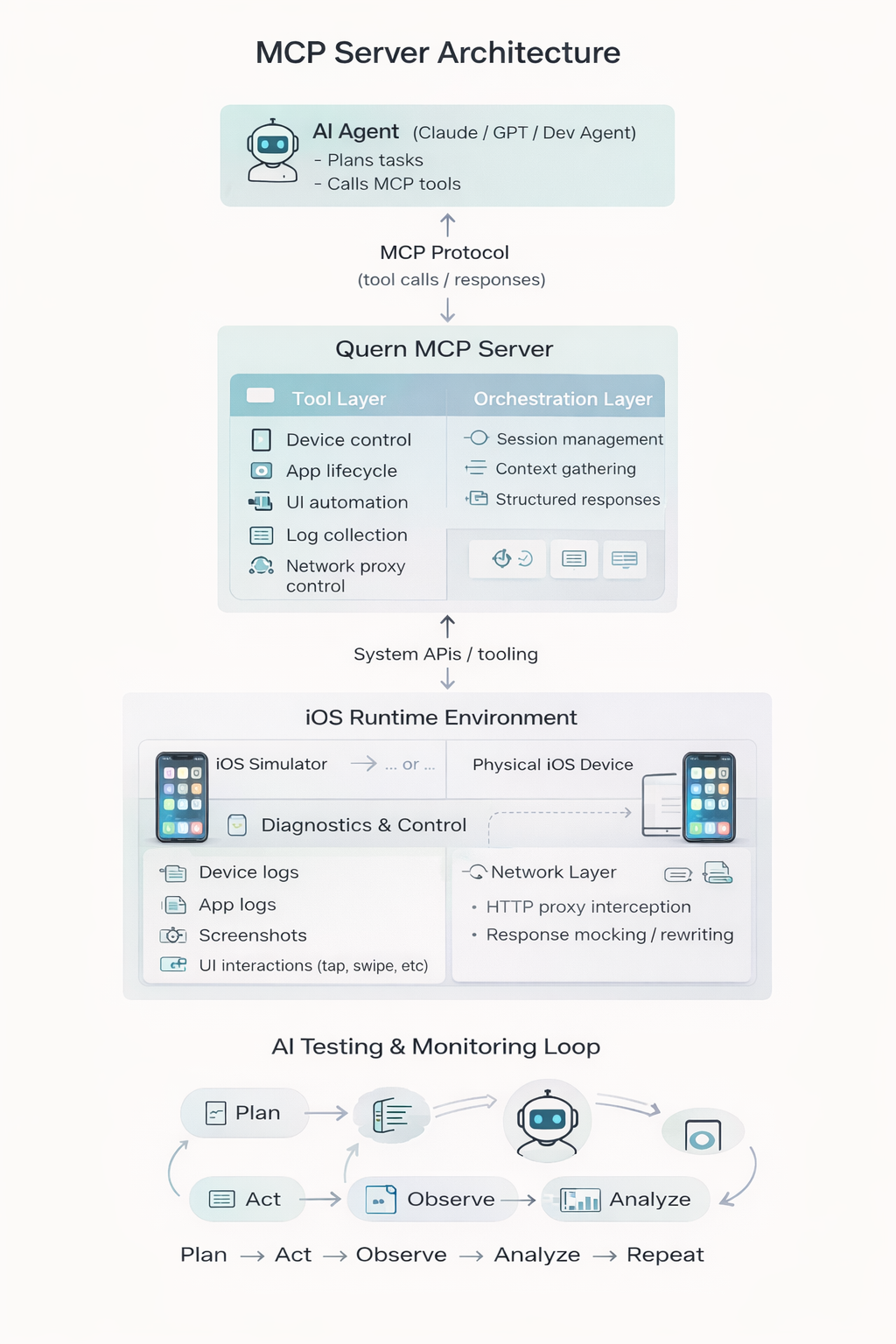
All open source or free. All capable. What didn’t exist was a unified API that an AI agent could drive coherently. Something that could take “check if the login flow works” and turn it into: launch the app, tap the login button, watch the network request go out, read the response, check the logs for errors, verify the next screen loaded.
That turned out to be the actual project.
Building Quern
I started building on February 9th. The architecture was clear to me from the start: an async Python FastAPI server that wraps all these tools behind a clean HTTP API, with a thin MCP (Model Context Protocol) wrapper so Claude Code can call them as tools.
Three pillars: logs, network proxy, device control.
By end of day two, I had 18 MCP tools working. Claude could read logs, inspect network traffic, tap buttons, take screenshots, and read the accessibility tree — all on iOS simulators. The first real test was pointing the proxy at Metatext’s login flow and watching Claude correlate log entries with network requests without me touching anything.
That was the moment it felt like it was going to work.
The first field test
I’d been updating Metatext to support V2 content filtering on Mastodon. After the implementation was done, I asked Claude to run through the manual test scenarios — the kind of matrix you’d normally grind through by hand: enable filtering, post content that should be filtered, verify it shows a warning, tap through to reveal it, check the API calls were correct, verify the filter persisted across app restart.
And then I went to lunch.
When I came back, Claude had completed four out of six test scenarios by itself. The two that failed turned out to be even more interesting than the four that passed — they uncovered a pre-existing bug in Metatext’s HTTP 500 error handling that had nothing to do with the content filtering work. The agent didn’t just verify my new feature; it caught an unrelated bug that had been lurking in the codebase.
That was February 13th, four days in.
Performance and the setup tax
The next few days were less glamorous. I hit 17–19 second delays on UI operations and had to instrument everything to find the bottleneck (it was client-side, in idb). I burned two full days on setup and CLI tooling — venv management, PATH fixes, Python 3.14 compatibility, the ./quern wrapper script. The kind of work that doesn't feel productive but is the difference between a prototype and something you’d actually want to use every day. And it was getting closer to something that I wouldn’t be embarrassed to share with others.
The proxy problem
If you’ve ever set up a proxy for mobile API debugging, you know the pain. Install Charles or Proxyman. Configure the system proxy or the simulator’s proxy settings. Generate a CA certificate. Install it on the device. Trust it in Settings. Hope your app doesn’t use certificate pinning. And that’s just to see the traffic.
If you want to actually do something with it — mock a response, intercept a request, simulate a server error — that’s another layer of configuration. Set up a map rule. Write the mock response by hand. Match the URL pattern. Get the content type right. Restart the proxy when you change something. And if you want to test error handling, you need to do this for every status code, every error format, every edge case. It’s tedious, repetitive work that most developers (heck, even most QA people) skip — which is why error handling is the least-tested part of most apps.
With Quern, an agent can do all of this in seconds by asking in plain English. “Mock the /api/v1/timelines endpoint to return a 500 with an empty body.” “Intercept the next request to api.mastodon.social and hold it so I can inspect it.” “Set up a mock that returns a rate-limit 429 response for the next 30 seconds.” The proxy is always running in the background — no configuration, no certificates to manage on simulators (Quern handles that). The agent just talks to it.
This feature alone is a game changer for error handling validation. Instead of manually crafting mock responses and rebuilding your proxy configuration for each scenario, you describe what you want and the agent sets it up, runs the test, and verifies the app handles it correctly. The kind of thorough error handling coverage that nobody has time to do manually suddenly becomes trivial.
The original proxy design had its own problems too — it configured the macOS system proxy on startup, routing all traffic through mitmproxy. If the server crashed, your entire machine lost internet access. I redesigned it to use local capture mode with mitmproxy’s Network Extension, which intercepts traffic at the process level. Each simulator’s traffic gets tagged independently. Your browser, Slack, everything else — completely unaffected. It’s magical.
Physical devices
Simulators are great, but real debugging happens on real hardware. This was the big leap in week three.
Everything that “just works” on a simulator needs a completely different stack on a physical device. Screenshots go through pymobiledevice3 via Apple’s tunneld service. UI automation goes through WebDriverAgent — Facebook’s open-source WebDriver (well, Quern Driver, now — heh) that runs on the device and exposes an HTTP API. Connection routing depends on iOS version: tunneld for iOS 17+, usbmuxd port forwarding for older devices.
I also built a native macOS preview app that mirrors the physical device’s screen in real time using CoreMediaIO — the same framework that lets your iPhone appear as a Quicktime video source in macOS. Agents can open and close preview windows per-device, or you can launch it from the dock and pick devices from a menu. Useful when you want to watch what the agent is doing, while your physical device is in a drawer or even in another room, like in my case, attached to my Mac Mini.
Making it self-healing
Physical devices are inherently less reliable than simulators. WDA crashes, tunnels drop, sessions go stale. The last thing I wanted was the agent stopping to ask me to restart something.
So the WDA client got a four-phase resilience upgrade: typed error hierarchy (so the code can distinguish “session expired” from “element not found” from “app crashed”), automatic session recovery (detect stale session, create new one, retry transparently), a chainable element query DSL, and automatic connection recovery (detect dead tunnel, reconnect, retry). The agent never sees any of this. Requests that would have been 500 errors now succeed after a brief pause.
What I’ve learned
Verification, not automation, is the first job. Everyone jumps to “AI test automation” but that’s step two. Step one is letting the agent answer: “did the thing I just built actually work?” That’s a lower bar and a higher-value outcome. The agent wrote a feature — now it can check its own work before you even look at it.
“Build succeeded” and “it actually works” are very different things. On the web, agents are closing that gap with tools like Playwright. Mobile has been left behind. There’s no reason it has to stay that way.
The product is the unification, not the parts. Every tool Quern wraps is open source / free and individually excellent. The value is in making them work together through a single API that an AI agent — or a human — can drive coherently.
Mobile apps are the last frontier for AI developer tooling. LLMs can write code, run tests, browse the web. But they’ve been blind to what’s happening on a phone. Giving them eyes, ears, and hands on a real device changes what’s possible in ways I’m still discovering.
Try it
Quern is open source (Apache 2.0), free, runs entirely on your Mac. No accounts, no cloud, no cost (besides the AI assistant you are already using).
curl -fsSL https://quern.dev/install | bashIt works with Claude Code, Cursor, or any MCP-compatible tool. You can also just use the HTTP API directly — it’s a debug server first, AI integration second (and AI-assisted UI automation platform third).
There is some unexplored magic in the fact that every tool that your AI can call, can also be called in python or javascript code that not only runs automations, but can reconfigure the proxy, pull real logs, and take screenshots. Try asking your agent to run the python script to perform the automation — fewer tokens burned, and an AI ready to investigate / fix the script if something goes wrong…
Right now Quern supports iOS simulators and physical devices. Android support — both emulators and physical devices — is on the horizon.
Building in public at quern.dev. The build log has week-by-week details if you want the technical deep dive.
I’d love to hear what you think — especially if you’re doing mobile development with AI tools and hitting the same walls I was.